Front Line |
|
Unknown |
| USE | The USE key that opens doors and activates switches in Half-Life is also used in Front Line Force to capture Capture Points when on the attacking team. To capture a Capture Point when you are an Attacker, stand near the Capture Point and press and hold down the USE key. A timer will appear near the bottem of your screen indicating how may seconds remain before the point is captured. During this time your weapon will holster and you will be venurable, so make sure you have teammates covering you from enemy fire! After the point is captured, your weapon returns and your team should advance your way to the next point. To stop the processes of capturing a point after you have begun to do so, simply either let go of the USE key or walk/run away from the Capture Point. Defenders cannot capture Capture Points. |
| PRIMARY ATTACK | This key triggers the normal fire mode of your weapon just like in Half-Life. |
| SECONDARY ATTACK | This key currenly only functions as the "zoom" key for the Sniper Rifle. For all other weapons it does nothing. |
| RELOAD | This key reloads your weapon when its clip has ran out of ammo. |
| COMMAND MENU | This key is used to active that ingame Command Menu, where you can send Radio Messages to other teammates, check the status of all Capture Points, or change your team, class, or weapons. |
| DROP ACTIVE WEAPON | This drops the current weapon you are holding so that you may pick up another weapon from the ground. Not all weapons can be dropped. |
| TOGGLE PRONE |
This button toggles the "prone" position, where the player lies flat on his or her stomach. While in prone mode, you
can crawl
around using the Forward, Backward, and use the Strafe Left and Strafe Right keys to roll. You cannot fire your weapon while
moving in prone. Prone is useful for the sneaky player who likes to attack his enemies while giving them little clue to his or her location. It takes a small moment to go from standing to prone position (or vice versa) in which time you cannot move, cannot fire, and are vunerable to attack. So make sure you don't go prone in a firefight! |
| CAPTURE POINT STATUS | This key brings up the "Capture Point Status" display, which can also be activated via the Command Menu. This screen tells you the current status of all the Capture Points. It displays the Name of the Capture Point, your current role (Attacking or Defending), and whether the point is "Captured" or "Free", which is also displayed in the color of the team who controls the Capture Point. |
| RADIO | This button brings up a menu of radio commands that can be activated via the number keys. Some people like to use it rather than the Command Menu. |
| Beretta .92fs | Medium Rate of Fire. Low Damage. Medium Accuracy. | |||
| Mk. 23 | Slow Rate of Fire. Medium damage. Medium Accuracy. |
| SPAS-12 | Medium Rate of Fire. Medium Damage. Medium Accuracy. |
| MP5A2 | Fast Rate of Fire. Medium Damage. Medium Accuracy. | |||
| MP5SD | Medium Rate of Fire. Medium damage. High Accuracy. Silencer attached. | |||
| Ingram MAC-10 | Very Fast Rate of Fire. Low damage. Low Accuracy. Silencer attached. | |||
| UMP .45 | Slow Rate of Fire. High damage. Medium Accuracy. |
| M4 Carbine | Slow Rate of Fire. Medium Damage. Medium Accuracy. Only usable by Assault & Support class. | |||
| Famas | Fast Rate of Fire. High damage. Very Low Accuracy. Only usable by Assault & Support class. | |||
| AK5 | Medium Rate of Fire. Medium damage. Medium Accuracy. Only usable by Assault & Support class. | |||
| MSG-90 | Slow Rate of Fire. High damage. High Accuracy (Zoomed). Only usable by Recon class. |
| H&K21 | Slow Rate of Fire. High Damage. Medium Accuracy. Only usable by Support class. |
![]() |
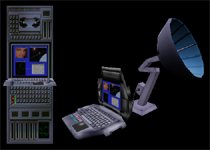
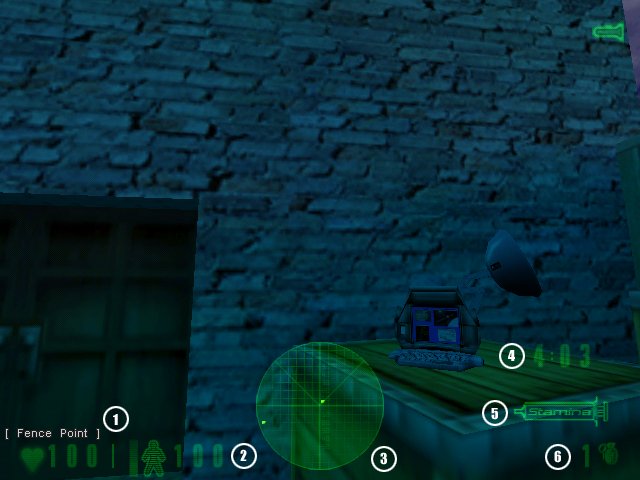
Capture Points are the main focus of Front Line Force. The capturing of these points determines whether your team loses. The object of the game is for the attacking team to capture these points, or for the Defending team to successfully stop the Attackers from capturing them. As an Attacker, press and hold your USE key when standing near a Capture Point to capture it. Your weapon will holster while you are capturing the point making you vunerable to attack, so make sure you have some team members backing you up. Each capture point takes a different amount of time to capture, and the class you are playing as effects the time it takes for you to capture a point. Recons can capture points faster than Assault, who in turn can capture faster than the Support class. When all Capture Points are captured, the Attackers win the round. As a Defender, your job is to protect the Capture Points at all costs. The only way your team can win is if the time left in the round runs out before the Attacking team can capture all of the points. Once a Capture Point is captured by the Attackers it cannot be "recaptured" back to your side. It is lost for the rest of the round, so you should move on and protect the remaining Capture Points. If your team successfully holds off the Attackers until the round time runs out, the Defenders win the round. |

![]() |
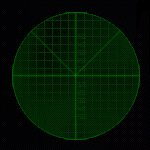
Your radar can be used to find other teammates or Capture Points near you. The bright dot in the center is you, with the triangle representing your current field of vision. Yellow dots on the radar are capture points, and green dots are your teammates. You can move the position of the radar in the "Advanced" menu under Multiplayer->Customize (where you set your player name). The positions can be Off, Bottem Center, Upper Right, or Upper Left. |
| The timer marks how much time is left during the round. Before the round begins it marks how much time is left in the warm-up period. As time runs out, the timer begins to flash, signifying that you are running out of time. |
![]() |
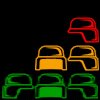
Team bonus is a new, unique feature in Front Line Force. It rewards players by staying with their team and using teamwork to accomplish the goal rather than going off on their own and getting themself killed. The more team mates are around you, the better your "Team Bonus Factor" is. Team Bonus slightly improves your accuracy as well as your Stamina rating. You also slowly regain health when you are near your teammates! The more teammates around you, the faster you regain your health. You can see how many team mates are affecting your "Team Bonus" by the number of helmets in the lower right of your HUD. If there is one red helmet, that means there is one teammate near you. Two yellow helmets mean there are two teammates near you. Three green helmets mean there are three or more teammates near you. No helmets mean you are all alone, and you should try to regroup with your team. |
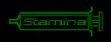
| Your Stamina Meter is on the lower right of your screen. It measures how much "Stamina" you have left. When you jump, your stamina goes down and recharges back up. Don't worry, you have plenty of Stamina to help avoid enemy fire or jump over a few crates, but if you are a "bunny hopper" then you will have to get used to not jumping around every 5 seconds. :) **NOTE** Stamina does NOT affect your speed of running, ducking, or anything else. It ONLY affects jumping. |
Server Commands:
mp_autoteambalance
This automatically balances the teams at the beginning of each round, making it more of a fair fight.
mp_timelimit (default 0 min)
Period between map rotations. If timelimit is
hit before a round is over, the round will finish before changing levels.
mp_flashlight (default 1)
Set to 1 to enable the use of flashlights, 0 to
disable.
mp_forcebalance
This makes it so that a player cannot join a team that already has more people than the other team. This helps balance out the teams and is highly recommended.
mp_roundlimit
When a team reaches the round limit (number of
wins), then the map switches.
mp_teamchange (default 1)
Allows players to switch teams after warm-up
time.
mp_friendlyfire (default 0)
Friendly Fire (players can damage their
teammates).
mp_footsteps (default 1)
Plays footstep sounds.
mp_allowspects (default 1)
Allows Spectators.
mp_spectchat (default 0)
Spectators can talk to Players currently playing
the game.
mp_allowicons (default 1)
Allows Team Icons (triangles).
sv_startmatch
This "restarts" the map without causing the players to load the map. Highly recommended for clan matches
and tournaments, this lets the map "start over" without having some players join later than others.
Client Commands:
mp_decals (default 300)
Decal Limit (reduce for better performance).
cl_radar (default 2)
Radar Position.
0 - Off
1 - Bottom
Center
2 - Upper Right
3 - Upper Left
cl_detail (default 1)
Detail Level. Change to 0 for better
performance.
cl_cphelp (default 1)
Capture Point Help (for new players).
cl_teamicons
Shows an icon over your teammate's head, identifying them as on your team.
cl_traceshots
Toggles whether you see the "tracer" effect some guns have.
+commandmenu
Brings up the Command Menu VGUI, where you can send radio
messages and change your settings.
+teamstatus
Shows Team Status menu
drop
Drops current weapon so that you may pick up another.
toggleprone
Allows you to go prone and get up again. When in prone you can
crawl forward and roll left/right, but you can only fire when not moving. When
you go into water you automatically go un-prone.
cpstatus
Displays Capture Point Status screen.
changeclass
Brings up the Change Class menu to change your class.
changeteam
Allows you to change your team.
changeweapons
Brings up the Weapon Selection menu to change your
weapons.
radio
Displays Radio menu.
radio 1
Displays Radio Report/Responces Menu
radio 2
Displays Radio Emergency Messages Menu
radio 3
Displays Radio Orders Menu
NOTE: All the radio menus can be accessed from the Radio menu.
timeleft
Displays the time left before the map changes.
Q: I'm having troubles with the mod acting strangely...
A: Try deleting your CONFIG.CFG file in your /half-life/frontline/ folder.
if that doesn't fix it feel free
to email one of us or visiting our "Help" forum on the web site.
Q: Some people have a radar, but I don't. How do i get one? Q: Some people have icons above their teammates heads, but i don't! How do i get them? Q: Why can't I pickup a weapon on the floor? Q: Hey, I can't hit anything, my accuracy sucks,
whats up with it? Q: I'm getting low FPS while playing Front Line, can't I do anything to fix
this? The Front Line Force Team is: Adrian "Pink" Finol - Code/Lead Designer Ildegardis "Deimos" Briceño - Models, Animations and
Graphics Russell "DOOManiac" Weed - Beta Testing Coordinator,
Mapper, Manual, Readme Mary "MaryB" Beth - Mapper Alfred "Alfred" Reynolds - Linux Porter Jorge "Nava" Nava - Player model creator Tom "Guiver" Guiver - Models, Skins, Graphics Sterling "BigGuy" Greene - VGUI Programmer,
Assistant Coder Ted "Cipher" Nugent - Graphics, Web Guy Valve Software Skins by: Textures by: Manual by Russell "DOOManiac" Weed
A: Go to Multiplayer->Customize->Advanced Options. There is an option there labelled
"Radar Status". Simply select where on the screeen you'd like your radar to appear.
A: Go to Multiplayer->Customize->Advanced Options. There is an option there labelled
"Icons over Teammates". Checking it puts an icon above your teammate's head easily
identifying him as on your team.
A: To pickup a
dropped weapon, you'll need to drop one of yours first, you will not be able to
pickup
more than 1 rifle or more than 1 heavy weapon at a time.
If you are a class that normally is not
allowed to choose a
weapon, you CAN still pick it up from the floor, but your accuracy will not be
as good, only use this as last resource.
A:
Accuracy is modified by movement, rate of fire and other factors. We suggest
using short controlled
burst to mantain a good accuracy, if you
are crouched or in prone position, you'll get a higher
accuracy
than if you were running. Jumping will give you the worst accuracy.
A: You can lower the detail level by using cl_detail 0, wich should
help a bit your framerates, also
you can always use our low
poly player models, using cl_himodels 0. NOTE: All these changes are
applied on the fly, so no need to restart or reconnect are
necesary.
A: We have a Mapping Tutorial
for mappers who wish to quickly set up their map for use with
Front Line Force! It is available at the Front Line Force Web Site: http://www.frontlineforce.com/
Credits
Special Thanks To:
Frank
"SiTh" Nuccio
Rewolf Software
Christopher McArthur
Shrike
Brandon
"Schrade" Renfrow
Phil "Fuel"
Sanford
Lance
Eric
Cherry
Paul 'MoOg'
Samways
Michael "ADSquirrel"
Melgares
Gooseman
Mr_Grim
Kwakkasaki
relic
Timay
All of
the FLF Beta Testers
tekk
Andrew Aumann
Cid
DigiChaos
Evile Dick
George_Pooshoes
Gorified
Kevin "Relic" Roberts
Maarten Bouwman
MacMan
Mazy
MikeZilla
TelNets
Russell 'DOOManiac' Weed
and various unknown artists